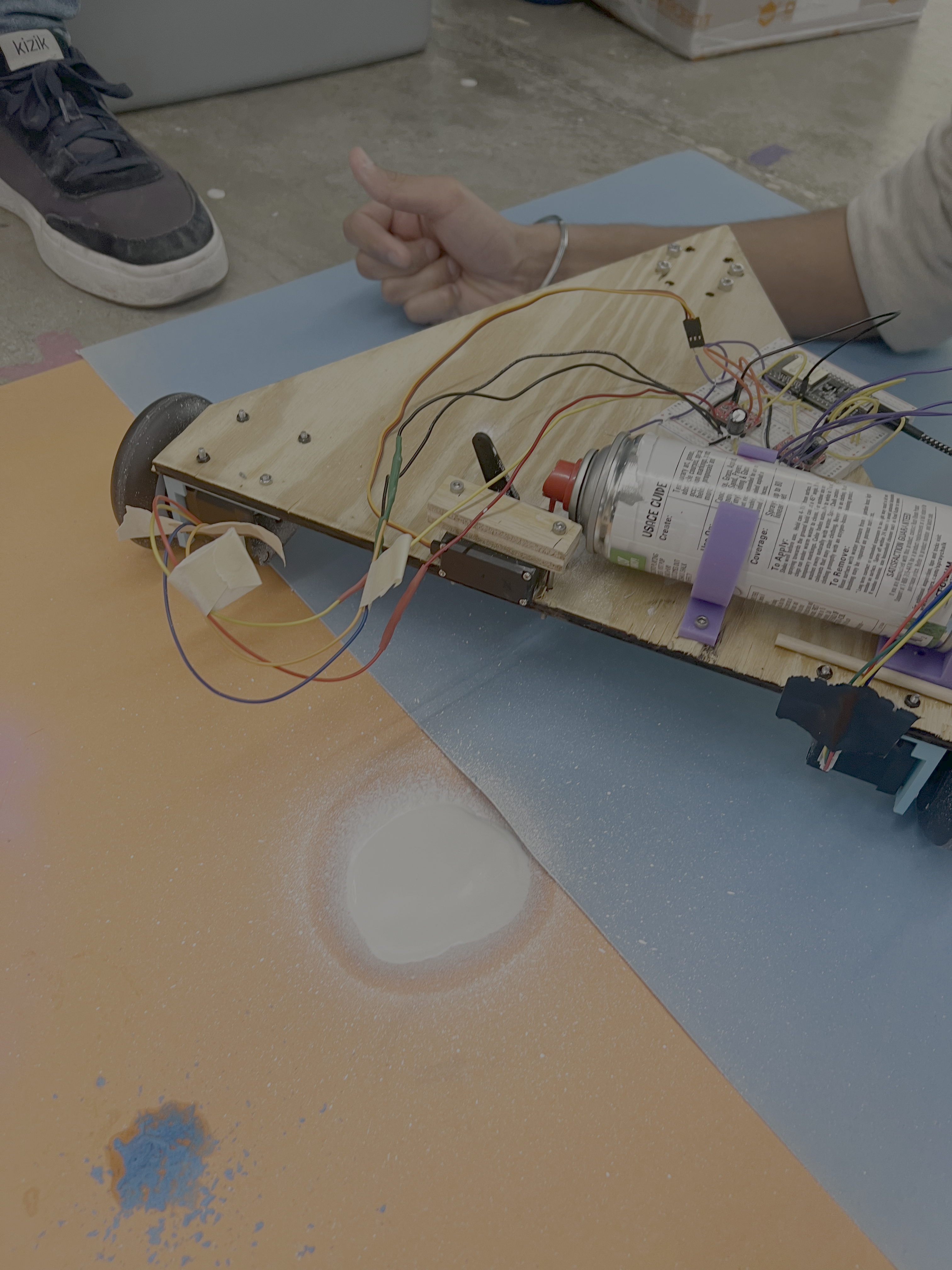
Weeks 10-12: Machine Building
In this week, we built a drawing robot, heavily inspired by Bobby's drawing robot. This robot is free-ranging, controlled by a simple web interface served from the arduino.Machine Chassis
We wanted the drawing effector to use a chalk spray can, with a servo to squeeze the can and spray chalk. We were originally going to use up to 4 different cans, but ultimately found that we could only use one of the spray cans we had.
The machine chassis was built using 3D printed parts, laser cut parts, and a few off-the-shelf (i.e. stolen from Bobby's machine) components. The main chassis is a laser-cut wooden equilateral triangle, measuring 42cm on each side. The servo mount (a friction-fit mount), stepper motor mount, and chalk spray can mount were 3D printed. We stole the wheels from Bobby's machine.
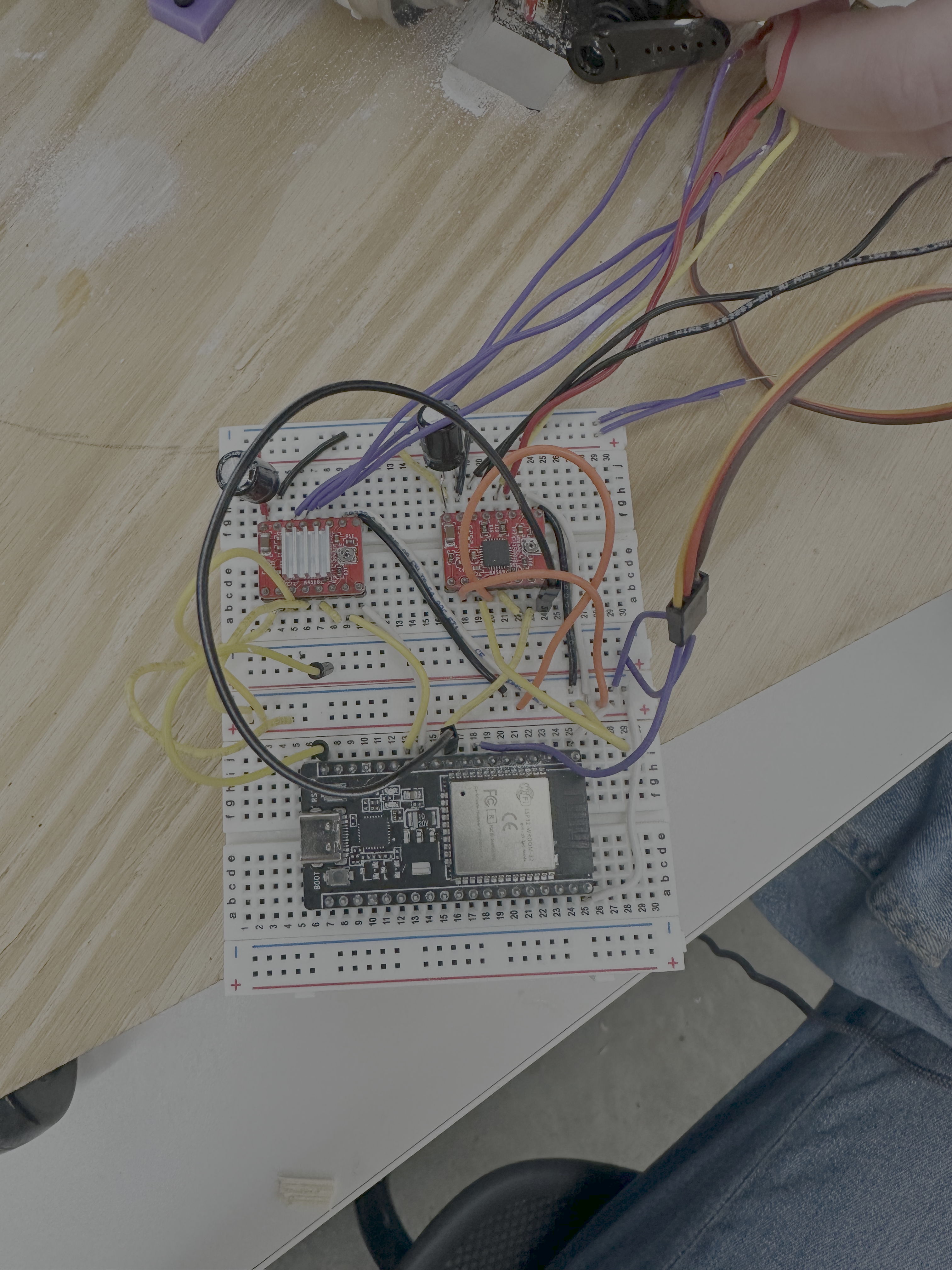
Electronics
Our main trouble with hooking up all the motors was that the esp wroom we were using had so many restrictions on the pins, and we spent many hours (with Bobby) first trying to get the stepper motors to work, and then trying to connect the servo (because we were connected to a pin which didn't work well with WiFi).
Software
I used Bobby's code as a base to do the software for the machine. However, I changed the web interface to allow a user to draw on the canvas, which would then generate the instructions to the machine (instead of having the user dictate draw/rotate instructions). This works client-side, so a js script takes mouse movements from the canvas and turns them into pen up/down, change color, move, and rotate instructions which are sent as a list of lists to the arduino. Then I also had to write the parser on the arduino to translate them into pre-defined cart instructions. I also added a bit of code to the cart to allow for pen up/down motions (through the servo).
Also, Bobby's code was very nicely segmented into different files, but I just wanted to upload a single file to the arduino, so I just put everything into a single file (sorry Bobby).
The only major change, besides these additions, that I made to the code was that the AsyncTCP and ESPAsyncWebServer libraries have a known type issue that requires a slight change to the library code. Firstly, the libraries must be installed from GitHub (clone and copy into Documents/Arduino/libraries): ESPAsyncWebServer and AsyncTCP.
Then, in the AsyncTCP library (AsyncTCP.cpp), I had to change the line at around 1648 from:
uint8_t AsyncServer::status() { to
uint8_t AsyncServer::status() const {
uint8_t status(); to uint8_t status() const;
Here's the final code:
#include <Arduino.h>
#include <WiFi.h>
#include <AsyncTCP.h>
#include <ESPAsyncWebServer.h>
#include <ArduinoJson.h>
#include <AccelStepper.h>
#include <ESP32Servo.h>
const int STEPS_PER_REV = 200;
StaticJsonDocument<500> doc;
const int MAX_NUM_INSTRUCTIONS = 100;
int instructions[MAX_NUM_INSTRUCTIONS][2];
int numInstructions = 0;
int currInstruction = 0;
bool playing = false;
int currentColor = 0; // 0: black, 1: red, 2: blue, 3: green
//CHANGE THESE VALUES TO BEST SUIT YOUR ROBOT
const int rightStepPin = 12;
const int rightDirPin = 14;
const int leftStepPin = 27;
const int leftDirPin = 26;
const int MAX_SPEED = 1000000;
const int ACCEL = 1000000;
const int MICROSTEPS = 16; //microstepping mode valid values (1,2,4,8,16)
const int WHEEL_RADIUS = 40; // radius of wheels in mm
const int AXLE_LENGTH = 386; //length from middle one wheel to the other in mm
const int servoPin1 =33;
const int servoPin2 = 39;
// Replace with your network credentials
const char* ssid = "MAKERSPACE";
const char* password = "12345678";
class Cart{
private:
AccelStepper left;
AccelStepper right;
Servo servo1;
Servo servo2;
long speed;
long accel;
unsigned int microsteps;
unsigned int wheelRadius;
unsigned int axleLength;
float mmToSteps;
public:
/*
* Initializes Cart
*
* param stepPin1: step pin of the left motor
* param dirPin1: direction pin of the left motor
* param stepPin2: step pin of the right motor
* param dirPin2: direction pin of the right motor
* param _speed: the max speed you want the cart to go in steps per second
* param _accel: the acceleration you want the cart to have in steps per second per second
* param _microsteps: the microstep stepping mode you are using (1,2,4,8,16)
* param _wheelRadius: radius of the wheels in mm
* param _axleLength: distance between the center of one wheel to the center of another
*/
Cart(int stepPin1, int dirPin1, int stepPin2, int dirPin2, long _speed, long _accel, unsigned int _microsteps, unsigned int _wheelRadius, unsigned int _axleLength, int servoPin1, int servoPin2){
left = AccelStepper(AccelStepper::DRIVER, stepPin1, dirPin1);
right = AccelStepper(AccelStepper::DRIVER, stepPin2, dirPin2);
servo1.attach(servoPin1);
servo2.attach(servoPin2);
speed = _speed;
accel = _accel;
microsteps = _microsteps;
wheelRadius = _wheelRadius;
axleLength = _axleLength;
mmToSteps = (STEPS_PER_REV * microsteps) / (2*PI*wheelRadius);
}
/*
* Sets the motor speed and acceleration according to what you defined in Cart
*/
void setupMotors(){
left.setAcceleration(accel);
right.setAcceleration(accel);
left.setMaxSpeed(speed);
right.setMaxSpeed(speed);
this->resetMotors();
}
/*
* Reset the motor position
*/
void resetMotors(){
left.setCurrentPosition(0);
right.setCurrentPosition(0);
}
/*
* Moves the cart in a straight line
*
* param steps: the number of steps you want to move either forward (positive) or (backwards)
*/
void move(long steps){
left.move(steps);
right.move(steps);
}
/*
* Rotates the cart in place
*
* param degrees: the number of degrees you want the robot to turn (negative: CCW, positive: CW)
* param direction: the direction you want the robot to turn (-1:CCW, 1: CW)
*/
void rotate(int degrees){
//amount of millimeters on the circumference needs to turn degrees amount of degrees
double totalMM = 2*PI*axleLength*(degrees/360.0);
//circumference of wheel/ steps per rotation * totalMMs gives total number of steps
long totalSteps = mmToSteps*totalMM;
left.move(totalSteps/2.0);
right.move(-1*totalSteps/2.0);
}
/*
* Moves the cart if the cart should be move (YOU NEED TO CALL THIS FUNCTION FOR THE CART TO RUN)
*/
void run(){
left.run();
right.run();
}
/*
* Returns if the cart has finished moving or not
*/
bool isDone(){
return left.distanceToGo() == 0 && right.distanceToGo() == 0;
}
/*
* Turns the pen on or off
*
* param color: the color you want to change the paint canister to (0: black, 1: red, 2: blue, 3: green)
* param val: true if you want to turn the pen on, false if you want to turn it off
*/
void pen(int color, bool val){
//change the state of the pen
//val = true: pen down, false: pen up
if(val){
// Serial.println("pen down");
if(color == 0){
for (int pos = 0; pos < 90; pos += 1) { // goes from 0 degrees to 180 degrees
// in steps of 1 degree
servo1.write(pos); // tell servo to go to position in variable 'pos'
delay(15); // waits 15ms for the servo to reach the position
}
}
else if(color == 1){
for (int pos = 0; pos <= 180; pos += 1) { // goes from 0 degrees to 180 degrees
// in steps of 1 degree
servo2.write(pos); // tell servo to go to position in variable 'pos'
delay(20); // waits 15ms for the servo to reach the position
}
}
// else if(color == 2){
// Serial.println("blue");
// }
// else if(color == 3){
// Serial.println("yellow");
// }
else{
Serial.println("invalid color");
}
}
else {
// Serial.println("pen up");
for (int pos = 90; pos > 0; pos -= 1) { // goes from 180 degrees to 0 degrees
// in steps of 1 degree
servo1.write(pos); // tell servo to go to position in variable 'pos'
delay(15); // waits 15ms for the servo to reach the position
}
}
}
};
const char index_html[] PROGMEM = R"rawliteral(
<!DOCTYPE html>
<html lang="en">
<head>
<meta charset="UTF-8">
<meta name="viewport" content="width=device-width, initial-scale=1.0">
<title>Instruction Generator</title>
<style>
canvas {
border: 2px solid black;
touch-action: none;
width: 600px;
height: 600px;
}
body {
font-family: sans-serif;
padding: 20px;
}
.container {
margin: 20px auto;
width: 80%;
}
.row {
display: flex;
flex-direction: row;
justify-content: space-between;
align-items: center;
}
.instructions {
list-style-type: circle;
height: 600px;
width: 200px;
overflow-y: auto;
border: 2px solid black;
}
.color-buttons {
margin-bottom: 10px;
}
.color-buttons button {
margin-right: 10px;
padding: 6px 12px;
border: none;
cursor: pointer;
font-weight: bold;
color: white;
}
</style>
</head>
<body>
<!-- HTML PAGE -->
<div class="container">
<h2>Drawing Robot</h2>
<p>
Draw below to generate instructions for the drawing robot. Calibrate will move the robot around
the canvas, and resetting zero will move the current position to (0,0), which is the top left
corner of the canvas. The orange triangle periodically shows the robot angle/position.
</p>
<div class="color-buttons">
<button onclick="setColor('black')" style="background-color: black">Black</button>
<button onclick="setColor('red')" style="background-color: red">Red</button>
<button onclick="setColor('blue')" style="background-color: blue">Blue</button>
<button onclick="setColor('green')" style="background-color: green">Green</button>
</div>
<div class="row">
<canvas id="drawCanvas" width="600" height="600"></canvas>
<ul id="instructions" class="instructions">
</ul>
</div>
<button onclick="zero()">Move to Zero</button>
<button onclick="calibrate()">Calibrate</button>
<button onclick="resetZero()">Reset Zero</button>
</div>
<script>
// Websocket handling
var gateway = `ws://${window.location.hostname}/ws`;
var websocket;
const MAX_CHUNK_SIZE = 100;
let isSending = false;
window.addEventListener('load', onLoad);
function initWebSocket() {
console.log('Trying to open a WebSocket connection...');
websocket = new WebSocket(gateway);
websocket.onopen = onOpen;
websocket.onclose = onClose;
websocket.onmessage = onMessage; // <-- add this line
websocket.onerror = onError;
}
function onOpen(event) {
console.log('Connection opened');
}
function onClose(event) {
console.log('Connection closed');
setTimeout(initWebSocket, 2000);
}
function onMessage(event) {
// robot sends an error for browser to retry send if its instruction buffer overflows
// else success message with # instructions stored
console.log(event.data)
const response = JSON.parse(event.data);
if (response.error === "robot_busy") {
console.warn("Robot busy, retrying...");
retryCurrentChunk();
} else if (response?.num_accepted && response.num_accepted > 0) {
console.log("Chunk accepted");
instructionBuffer = instructionBuffer.slice(response.num_accepted); // slice from num_accepted to end
sendNextChunk();
}
}
function onLoad(event) {
initWebSocket();
}
function onError(event) {
console.error("WebSocket error", err);
retryCurrentChunk();
}
function sendNextChunk() {
// only send if there are instructions to send
if (instructionBuffer.length === 0) {
isSending = false;
console.log("All instructions sent");
return;
}
const chunk = instructionBuffer.slice(0 , MAX_CHUNK_SIZE); // implicitly takes min(MAX_CHUNK_SIZE, buffer.length)
const payload = {
numInstructions: chunk.length,
instructions: chunk
};
websocket.send(JSON.stringify(payload));
isSending = true;
}
function retryCurrentChunk() {
setTimeout(() => {
sendNextChunk();
}, 5000);
}
// Browser-side drawing logic on canvas element
const canvas = document.getElementById("drawCanvas");
const ctx = canvas.getContext("2d");
const instructionsEl = document.getElementById("instructions");
let drawing = false; // detects pen down or up
let instructionBuffer = []; // stores robot instructions
// robot values (position, angle, color)
let lastX = 0, lastY = 0;
let currentX = null, currentY = null;
let lastAngle = 0;
let startX = null, startY = null;
let currentColor = 'black';
// for reset zero values
let offsetX = 0;
let offsetY = 0;
const COLORMAP = {
'black': '0',
'red': '1',
'blue': '2',
'green': '3'
};
// draws orange triangle for robot position
function drawTurtle(x, y, angle) {
const size = 10; // size of the turtle
ctx.save();
ctx.translate(x, y);
ctx.rotate((angle * Math.PI) / 180 + Math.PI / 2);
ctx.fillStyle = 'orange';
ctx.beginPath();
ctx.moveTo(0, -size);
ctx.lineTo(size / 2, size);
ctx.lineTo(-size / 2, size);
ctx.closePath();
ctx.fill();
ctx.restore();
}
// helper function to get angle of robot (0 is left)
function getAngle(x1, y1, x2, y2) {
return Math.atan2(y2 - y1, x2 - x1) * 180 / Math.PI;
}
// helper function to get distance between two points
function getDistance(x1, y1, x2, y2) {
return Math.hypot(x2 - x1, y2 - y1);
}
// function for adding pen change instructions
function setColor(color) {
ctx.strokeStyle = color;
if (currentColor !== color) {
instructionBuffer.push(["color", COLORMAP[color]]);
let li = document.createElement("li");
li.appendChild(document.createTextNode(`Change color to: ${color}`));
instructionsEl.appendChild(li);
currentColor = color;
}
}
// function for moving to zero (left top corner of canvas)
function zero() {
if (lastX != null && lastY != null) {
const angleToZero = getAngle(lastX, lastY, 0, 0);
const distanceToZero = getDistance(lastX, lastY, 0, 0);
// Rotate back to 0,0
let deltaAngle = angleToZero - lastAngle;
deltaAngle = Math.round(deltaAngle >= 0 ? deltaAngle : 360 + deltaAngle);
if (!isNaN(deltaAngle)) {
instructionBuffer.push(["rotate", deltaAngle]);
let liRot = document.createElement("li");
liRot.appendChild(document.createTextNode(`Rotate: ${deltaAngle}°`));
instructionsEl.appendChild(liRot);
}
instructionBuffer.push(["move", Math.round(distanceToZero)]);
let liMove = document.createElement("li");
liMove.appendChild(document.createTextNode(`Move: ${Math.round(distanceToZero)}`));
instructionsEl.appendChild(liMove);
}
lastX = 0;
lastY = 0;
lastAngle = 0;
}
// function for sending instructions of robot around canvas
function calibrate() {
const canvasWidth = canvas.width;
const canvasHeight = canvas.height;
const path = [
{ x: 0, y: 0 }, // top-left (origin)
{ x: canvasWidth, y: 0 }, // top-right
{ x: canvasWidth, y: canvasHeight }, // bottom-right
{ x: 0, y: canvasHeight }, // bottom-left
{ x: 0, y: 0 }, // back to top-left
];
let cx = currentX;
let cy = currentY;
let heading = lastAngle || 0;
path.forEach((pt, i) => {
const angle = getAngle(cx, cy, pt.x, pt.y);
const distance = getDistance(cx, cy, pt.x, pt.y);
const deltaAngle = Math.round((angle - heading + 360) % 360);
if (deltaAngle !== 0) {
instructionBuffer.push(["rotate", deltaAngle]);
li = document.createElement("li");
li.appendChild(document.createTextNode(`Rotate: ${deltaAngle}°`));
instructionsEl.appendChild(li);
}
instructionBuffer.push(["move", Math.round(distance)]);
li = document.createElement("li");
li.appendChild(document.createTextNode(`Move: ${Math.round(distance)}`));
instructionsEl.appendChild(li);
heading = angle;
cx = pt.x;
cy = pt.y;
});
currentX = cx;
currentY = cy;
lastAngle = heading;
}
// function for resetting the zero position of the robot (& shifting canvas appropriately)
function resetZero() {
const deltaX = -currentX;
const deltaY = -currentY;
offsetX += deltaX;
offsetY += deltaY;
// store existing drawing in separate canvas
const offscreen = document.createElement('canvas');
offscreen.width = canvas.width;
offscreen.height = canvas.height;
const offCtx = offscreen.getContext('2d');
// copy drawing to the offscreen canvas
offCtx.drawImage(canvas, 0, 0);
// clear main canvas
ctx.clearRect(0, 0, canvas.width, canvas.height);
// redraw from offscreen with offset
ctx.save();
ctx.translate(deltaX, deltaY);
ctx.drawImage(offscreen, 0, 0);
ctx.restore();
// update cursor positions so new drawings align correctly
lastX += deltaX;
lastY += deltaY;
currentX += deltaX;
currentY += deltaY;
// Add instruction for resetZero (visual only: no difference on robot settings)
let li = document.createElement("li");
li.appendChild(document.createTextNode("Reset zero to current position"));
instructionsEl.appendChild(li);
}
// push instructions when new stroke added, including instructions to get robot in position
canvas.addEventListener("pointerdown", (e) => {
const rect = canvas.getBoundingClientRect();
currentX = e.clientX - rect.left;
currentY = e.clientY - rect.top;
// add instructions to get from last stroke positino to new position
if (lastX != null && lastY != null) {
const angle = getAngle(lastX, lastY, currentX, currentY);
const distance = getDistance(lastX, lastY, currentX, currentY);
let deltaAngle = angle - (lastAngle ?? angle);
deltaAngle = Math.round(deltaAngle >= 0 ? deltaAngle : 360 + deltaAngle);
if (lastAngle !== null && deltaAngle !== 0) {
instructionBuffer.push(["rotate", deltaAngle]);
let li = document.createElement("li");
li.appendChild(document.createTextNode(`Rotate: ${deltaAngle}°`));
instructionsEl.appendChild(li);
}
instructionBuffer.push(["move", Math.round(distance)]);
let liMove = document.createElement("li");
liMove.appendChild(document.createTextNode(`Move: ${Math.round(distance)}`));
instructionsEl.appendChild(liMove);
lastAngle = angle;
}
// Only after rotation + move, put pen down
instructionBuffer.push(["pen", 1]);
let liPen = document.createElement("li");
liPen.appendChild(document.createTextNode(`Pen down`));
instructionsEl.appendChild(liPen);
// update position + start drawing
lastX = currentX;
lastY = currentY;
drawing = true;
});
// update currentX and currentY on pointer move
canvas.addEventListener("pointermove", (e) => {
if (!drawing) return;
const rect = canvas.getBoundingClientRect();
currentX = e.clientX - rect.left;
currentY = e.clientY - rect.top;
});
// end stroke when pen up or leave canvas (& add instruction)
function endStroke() {
if (drawing) {
instructionBuffer.push(["pen", 0]);
let li = document.createElement("li");
li.appendChild(document.createTextNode(`Pen up`));
instructionsEl.appendChild(li);
}
drawing = false;
}
canvas.addEventListener("pointerup", endStroke);
canvas.addEventListener("pointerleave", endStroke);
// Sampling loop every 100ms so we don't have too many instructions
setInterval(() => {
// add move/rotate instructions while drawing
if (drawing && lastX != null && currentX != null) {
const angle = getAngle(lastX, lastY, currentX, currentY);
const distance = getDistance(lastX, lastY, currentX, currentY);
if (distance > 1) {
let deltaAngle = angle - (lastAngle ?? angle);
deltaAngle = Math.round(deltaAngle >= 0 ? deltaAngle : 360 + deltaAngle);
if (lastAngle !== null && deltaAngle !== 0) {
// instructionBuffer.push["pen", 0];
instructionBuffer.push(["rotate", deltaAngle]);
// instructionBuffer.push["pen", 1];
let li = document.createElement("li");
li.appendChild(document.createTextNode(`Rotate: ${deltaAngle}°`));
instructionsEl.appendChild(li);
}
instructionBuffer.push(["move", Math.round(distance)]);
let li = document.createElement("li");
li.appendChild(document.createTextNode(`Move: ${Math.round(distance)}`));
instructionsEl.appendChild(li);
ctx.beginPath();
ctx.strokeStyle = currentColor;
ctx.moveTo(lastX, lastY);
ctx.lineTo(currentX, currentY);
ctx.stroke();
lastAngle = angle;
lastX = currentX;
lastY = currentY;
}
}
}, 100);
// batch sends over web-socket
setInterval(() => {
drawTurtle(currentX, currentY, lastAngle);
if (!isSending && instructionBuffer.length > 0) {
sendNextChunk();
}
}, 1000);
</script>
</body>
</html>
)rawliteral";
Cart drawingRobot(leftStepPin,leftDirPin, rightStepPin, rightDirPin, MAX_SPEED, MICROSTEPS, MICROSTEPS, WHEEL_RADIUS, AXLE_LENGTH, servoPin1, servoPin2);
// Create AsyncWebServer object on port 80
AsyncWebServer server(80);
// Create a WebSocket object
AsyncWebSocket ws("/ws");
// Initialize WiFi
void initWiFi() {
// Serial.println("hello?");
WiFi.mode(WIFI_STA);
WiFi.begin(ssid, password);
Serial.print("Connecting to WiFi ..");
while (WiFi.status() != WL_CONNECTED) {
Serial.print('.');
delay(1000);
}
Serial.println(WiFi.localIP());
}
//handle message from web socket client (the message from your browser)
void handleWebSocketMessage(void *arg, uint8_t *data, size_t len)
{
AwsFrameInfo *info = (AwsFrameInfo *)arg;
if (info->final && info->index == 0 && info->len == len && info->opcode == WS_TEXT)
{
data[len] = 0;
String message = (char *)data;
// if (!drawingRobot.isDone() || currInstruction < numInstructions)
if (currInstruction < numInstructions)
{
ws.textAll("{\"error\":\"robot_busy\"}");
return;
}
DeserializationError error = deserializeJson(doc, message);
if (error)
{
Serial.print("Parsing failed: ");
Serial.println(error.c_str());
ws.textAll("{\"error\":\"parsing_failed\"}");
return;
}
// drawingRobot.resetMotors();
numInstructions = doc["numInstructions"];
for (int i = 0; i < min(numInstructions, MAX_NUM_INSTRUCTIONS); i++)
{
String movementType = doc["instructions"][i][0];
if (movementType == "move") {
instructions[i][0] = 0;
} else if (movementType == "rotate") {
instructions[i][0] = 1;
} else if (movementType == "color") {
instructions[i][0] = 2;
} else if (movementType == "pen") {
instructions[i][0] = 3;
} else {
Serial.println("Invalid movement type: " + movementType);
ws.textAll("{\"error\":\"invalid_movement_type\"}");
return;
}
instructions[i][1] = doc["instructions"][i][1];
}
currInstruction = 0;
ws.textAll("{\"num_accepted\": " + String(numInstructions) + "}");
}
}
//handles different websocket events like if the client disconnects or something
void onEvent(AsyncWebSocket *server, AsyncWebSocketClient *client, AwsEventType type, void *arg, uint8_t *data, size_t len) {
switch (type) {
case WS_EVT_CONNECT:
Serial.printf("WebSocket client #%u connected from %s\n", client->id(), client->remoteIP().toString().c_str());
break;
case WS_EVT_DISCONNECT:
Serial.printf("WebSocket client #%u disconnected\n", client->id());
break;
case WS_EVT_DATA:
handleWebSocketMessage(arg, data, len);
break;
case WS_EVT_PONG:
case WS_EVT_ERROR:
break;
}
}
void initWebSocket() {
ws.onEvent(onEvent);
server.addHandler(&ws);
}
void setup() {
Serial.begin(115200);
initWiFi();
initWebSocket();
// Web Server Root URL
server.on("/", HTTP_GET, [](AsyncWebServerRequest *request) {
request->send(200, "text/html",index_html);
});
// Start server
server.begin();
drawingRobot.setupMotors();
// Pen up turns all servos up
drawingRobot.pen(0, false);
}
// bool prev = true;
void loop() {
// // TESTING CODE FOR MVMT
// if (drawingRobot.isDone() && prev == 0) {
// Serial.println("move");
// drawingRobot.move(10);
// prev = 1;
// } else if (drawingRobot.isDone()) {
// Serial.println("rotate");
// drawingRobot.rotate(90);
// prev = 0;
// }
// TESTING CODE FOR SERVO
// if (prev) {
// drawingRobot.pen(0, false);
// prev = false;
// } else {
// drawingRobot.pen(0, true);
// prev = true;
// }
// if the robot is done completely its last instruction and has more instructions to do
// then have it do the next instruction
if (drawingRobot.isDone() && currInstruction < numInstructions){
if(instructions[currInstruction][0] == 0){
int steps = instructions[currInstruction][1] * 10;
drawingRobot.move(steps);
}
else if (instructions[currInstruction][0] == 1){
int degree = instructions[currInstruction][1];
if (degree > 180) {
degree = (-1)*(360-degree);
}
drawingRobot.rotate(instructions[currInstruction][1]);
}
else if (instructions[currInstruction][0] == 2){
currentColor = (int) instructions[currInstruction][1];
}
else if (instructions[currInstruction][0] == 3){
drawingRobot.pen(currentColor, instructions[currInstruction][1]);
}
currInstruction += 1;
}
drawingRobot.run();
ws.cleanupClients();
}
Demo
Here's a video of the machine in action drawing a "circle!" Our machine is so slow that the effector ran out of chalk.
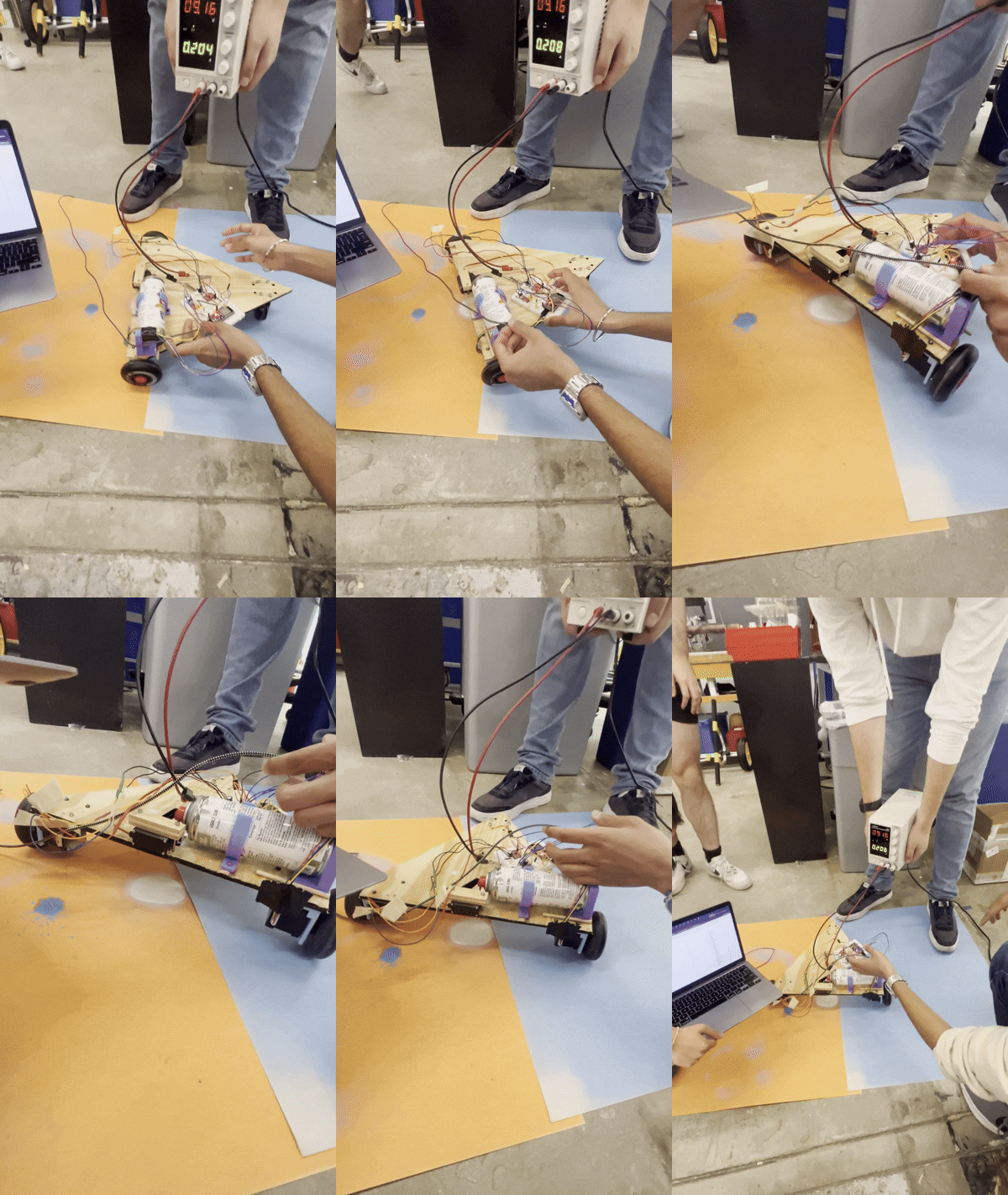
And finally, here's a picture of the end-result!